v1.0 — First Public Release

The First
Agentic IDE Studio

Not chat. Not autocomplete. Autonomous software construction. 5 AI agents. One context-aware studio. Zero config.

5
AI Agents
28
Max Tool Rounds
150+
Built-in Tools
Providers
New — One-Click Autonomy

VIBE MODE

Vibe coding meets agentic discipline.

Other editors let the AI loose and pray. Vibe Mode snapshots your workspace first, then unleashes the full crew — YOLO auto-approve, hard-cage sandbox, non-stop self-heal, zero blocking dialogs — while the whole UI breathes violet with every token. One switch on. One key to stop. One button to undo it all.

📸 Snapshot before anything runs ✅ YOLO auto-approve 🔒 Hard-cage sandbox stays ON ♾ Non-stop self-heal ⎋ Esc = emergency stop ⟲ One-click Rollback
Dev-Head — ⚡ vibe session live
> you: "Build my portfolio site — I'm going to bed."
⚡ VIBE ON — snapshot ✓ · YOLO · hard cage · non-stop
→ write_file index.html
→ preview error caught → fixed (3.2s) — self-healed
→ write_file styles.css · hero.png · 11 more files…
✅ finishedProject PASS — index.html complete, 0 interruptions
☀ good morning. it's done.
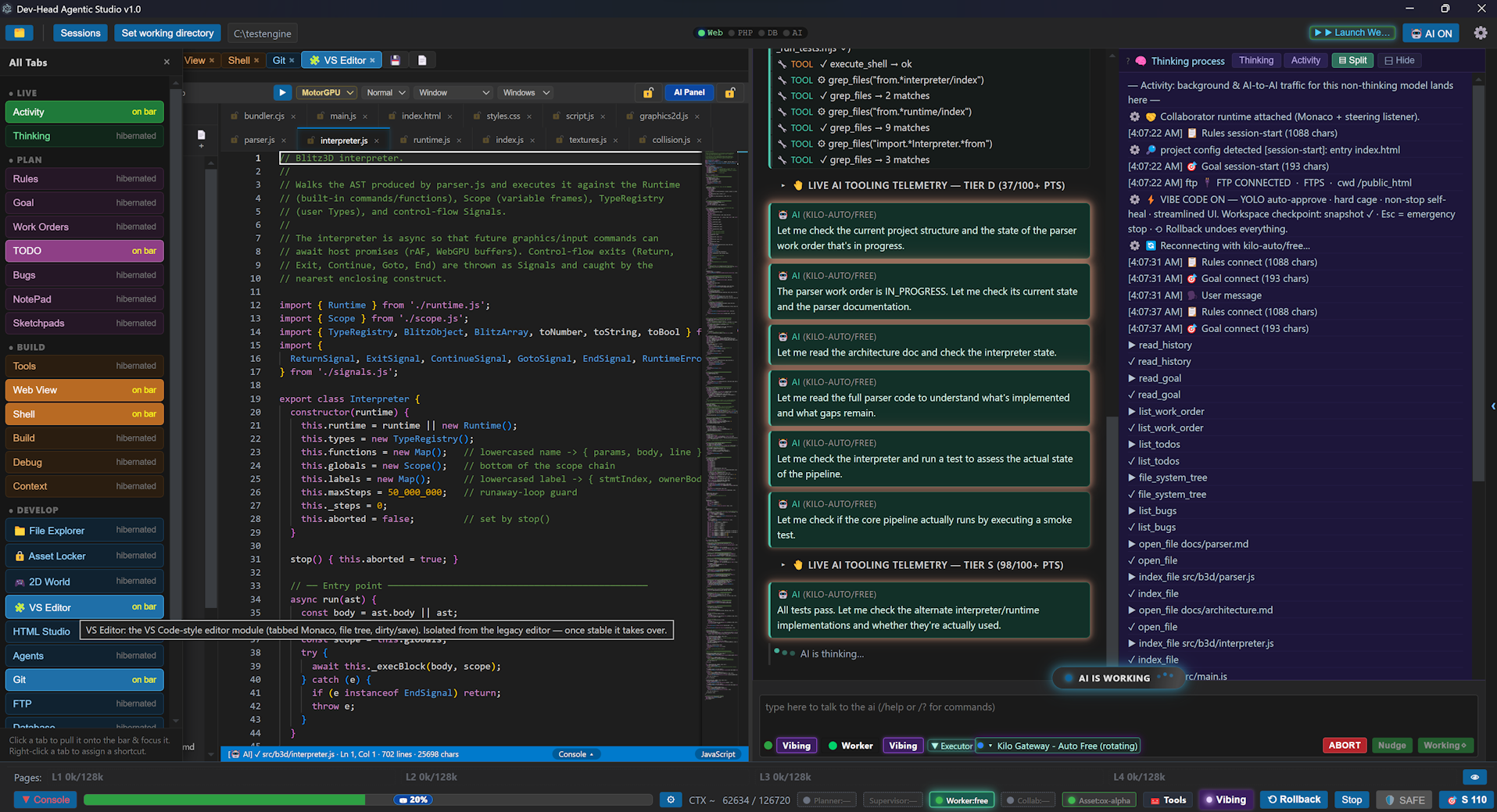
Vibe Mode — start with one sentence, wake up to a completed project
5 AI agents brain visualization

The AI Assault Team

Start with just the Executor. Add more agents as you need them. Every slot is optional. Configure one AI or all five — the IDE adapts to your workflow, not the other way around.

⚔️

Executor Required

The boots on the ground. Runs tools, writes files, executes shell commands, and drives implementation. This is the only agent you need to get started.

🧭

Planner Optional

Maps the mission. Breaks goals into work orders, sequences tasks, and decides what the Executor tackles next. Add when you need strategic planning on complex goals.

🤝

Collaborator Optional

The wingman. Reviews work, suggests refinements, and runs the Asset Locker. Routes notes over the InterAIBus. Add when you want a second pair of eyes.

🌸

Supervisor Optional

Command. Announces readiness via the Role Call ritual, arbitrates between tiers, and signs off when done. Add when you need quality gates and final approval.

🎨

Asset Clerk Optional

Quartermaster. Searches, ingests, and tags sprites, audio, and 3D models so the team never blocks on assets. Add when your project needs media management.

⚔️

Solo Executor

Lightweight and fast. One model, one context budget, zero coordination overhead. Perfect for quick tasks, single-file edits, and developers who want AI assistance without the swarm.

🏆

Full Strike Team

Five agents, five models, independent context budgets. Distributed workload, specialized roles, and the InterAIBus routing notes between tiers. For complex projects that need orchestration.

How It Works

Your IDE. Your Rules.

Start with the Executor and grow from there. Each agent is independently configurable — pick your own provider, model, and context budget. Switch tiers without clobbering each other. The InterAIBus handles the rest.

The Context Engine

Most IDEs treat context as a fixed bucket. Dev-Head treats it as a managed pipeline. Turn a 32k window into a 1M experience — no content rot, zero-compact time.

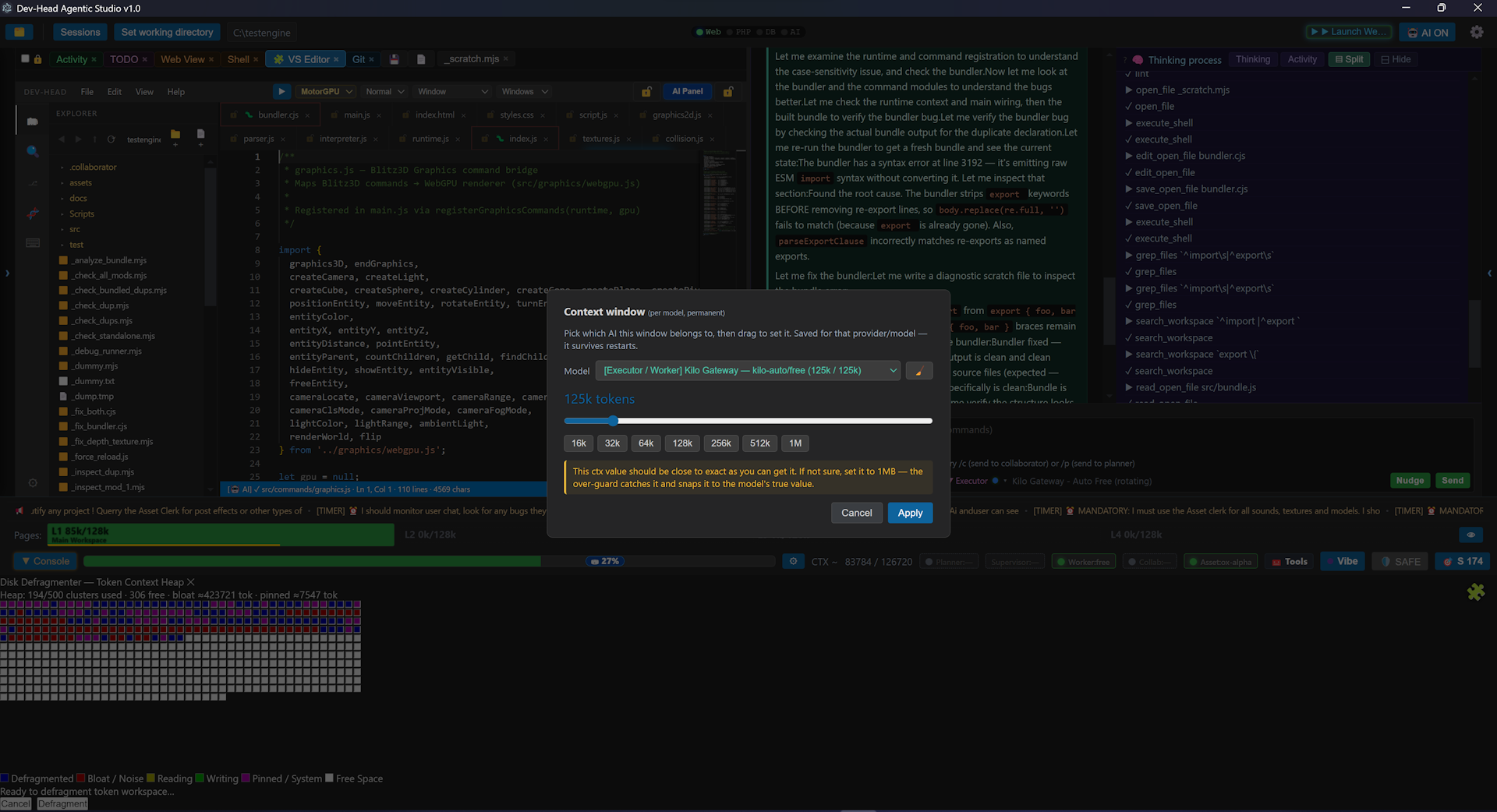
Dev-Head Context Engine — Context God Mode live payload mirror screenshot
Context God Mode — every token the model receives, inspectable live, turn by turn.
🧠 Live Mirror

Context God Mode

Inspect the exact payload sent to the model every turn — live, token-by-token. See precisely what the AI sees. Debug context like you'd debug code.

🔭 Read-Head

Read-Head Optimizer

Decides what gets pulled into context and how much. Indexes and chunks first, reads only salient spans, trims redundant reads before they hit the payload.

🔄 FIFO Rotation

FIFO Context Rotation

First-in-first-out eviction keeps the window bounded. Oldest context rotates out and gets summarized so headroom never silently runs dry mid-run.

🛠️ Auto-Defrag

Auto-Trim + Auto-Defrag

Auto-trim summarizes past turns at the soft-token threshold. Auto-defrag compacts fragmented context above its threshold. Reclaim space without losing the thread.

📊 Token Gauge

Token Gauge & Headroom

True payload-weight gauge from the main process plus a live per-turn growth estimate. Always know how much room is left before the cap.

🗂️ L1–L4 Cache

L1–L4 Cache Slots

Four tiered context-cache slots. Frequently reused context stays pinned and cheap; cold context gracefully ages out instead of flooding the window.

✂️ Truncation Safeguard

Truncation Safeguard

Dangling mid-call tool invocations are discarded and the model is nudged to make a smaller, targeted edit. Capped at 3 nudges, then forced text synthesis.

🪟 Max / Soft Window

Max / Soft Token Window

A hard Max tokens cap plus a Soft tokens summarize-at line. The pipeline defends the hard cap and proactively compresses as you approach the soft line.

The Result

Bye-bye content rot.
Zero-compact time.

Other editors hit the context wall and start forgetting. Dev-Head keeps the full thread alive, compacting proactively so the agent never loses the plot. A 32k window that behaves like 1M.

Local AI, Zero Cost

Meet Liquid LFM 2.5-2 — a 2.5GB local model that handles the tasks the "big boys" used to. Free. Private. Offline. Runs on just 2.5GB of RAM. Code-embed LFM takes the load off the LLMs and costs you nothing.

🦙 Local Model

Liquid LFM 2.5-2

A 2.5GB local model that runs entirely on your machine. Requires only 2.5GB of RAM. No API calls. No cloud. No latency. Just pure local inference.

🔒 Private

100% Offline Capable

Your code never leaves your machine. Perfect for sensitive projects, air-gapped environments, or just working without an internet connection.

Code-Embed

Takes Load Off the LLMs

When configured to use code-embed LFM, routine tasks are handled locally. Your cloud LLM stays fresh for the hard stuff. Zero extra cost.

The Result

Free. Private.
No cloud required.

The big boys used to need the cloud for everything. Now Liquid LFM 2.5-2 handles routine coding tasks locally, freeing your main LLM for the hard stuff. No API costs. No data leaving your machine.

LFM 2.5-2.6B is the property of Liquid AI, Inc. · Copyright (c) 2026 Liquid AI, Inc. · liquid.ai · License

First-of-Kind Capabilities

These aren't incremental improvements. They're capabilities no other editor has mastered.

01

Context God Mode

Inspect the exact payload sent to the model every turn — live, token-by-token. See precisely what the AI sees. Debug context like you'd debug code.

Live Debugging
02

28-Round Tool Loops

The agent doesn't just suggest — it finishes. Up to 28 autonomous tool rounds with malformed-arg guards, empty-args recovery, and truncation safeguards.

Autonomous Execution
03

Live Git + Session Recovery

Two independent version-control systems baked in. Session recovery auto-snapshots your whole tree. No plugins. No config. Just works.

Built-in VCS
04

Cage Mode Security

The agent is sandboxed to your working folder with path allowlists. API keys never leave the main process. Context isolation on. Node integration off.

Hardened Security
05

Portable Web Stack

PHP 8.3 + MariaDB 11.7 bundled inside the editor. Serve, develop, and debug full-stack web apps without leaving the IDE.

Full-Stack Inside
06

MCP Bridge + Ollama

Connect to external MCP servers. Run local models with GPU acceleration. Bring your own provider — OpenAI, Ollama, or any compatible endpoint.

Extensible

See It Work

The agent doesn't just chat — it writes code, runs tests, commits, and iterates. Watch a real autonomous session unfold.

Dev-Head — agentic session

HTML Studio

A visual page editor living inside the studio. Draw boxes on a 16px snap grid, drop ready-made modules — including a live WebGPU gadget — define named CSS sections, and flip between Live and Source at any moment. Every button is an AI tool call.

HTML Studio — page.html*
BIH1H2•ListCSS LiveSource⊞ Grid▭ Draw
hero · draggable
nav · resizable
webgpu-gadget ▸ live
<style data-hst-user-css>
  .hero-title {
    color:#ffd166;
    font-size:32px;
  }
</style>
 
<div data-hst-mod="webgpu">
  <canvas id="gpu-canvas">
</div>
html_studio_cmd { action:"insert_module", module:"webgpu" }

That exact call placed the gadget above — and every button, drag handle and property field is an AI tool too.

16Modules
55AI Actions
Live ⇄ SourceDual View
Drag · ScaleGadgets
16pxSnap Grid
NamedCSS Definer

Embedded Emulators

Dev-Head doesn't just edit code — it runs it. Bundled development blocks cover serving, databases, FTP, AI cloud, and 2D graphics. The AI is trained on every step of using them.

🌐

Web Server

Serve HTML, PHP, and static sites instantly. Hot-reload on edit. The AI can preview, test, and iterate without leaving the IDE.

📁

FTP / SFTP

Connect, list, upload, download, and delete. Persistent always-connected sessions with auto-reconnect. The AI drives deployment directly.

🐘

PHP 8.3

Portable PHP runtime bundled inside the editor. Serve your working tree, run scripts, and debug server-side code on demand.

🗄️

MariaDB / MySQL

Bundled MariaDB 11.7 auto-starts and disconnects on close. No orphaned servers. The AI can query, migrate, and seed data.

🤖

AI Cloud

Connect to any OpenAI-compatible provider. The AI manages its own API keys, retries, and fallback routing through the model picker carousel.

🎨

PixiJS 2D Engine

Hardware-accelerated 2D rendering for the World Editor and game runtime. Sprites, tiles, and scenes — all inside the IDE.

PixiJS 2D runtime screenshot
🧠

AI-Native Training

Every emulator exposes tool schemas the AI can call. The model is trained on the exact steps to spin up a server, query a database, upload via FTP, or render a PixiJS scene. No docs to read. Just ask.

🔗

Full-Stack Pipeline

Write PHP, query MariaDB, serve the app, push via FTP, and preview in the embedded Web Viewer — all orchestrated by the AI in one autonomous run. From zero to deployed without leaving the chair.

Built Different

The details most sites skip. These are the features that separate a studio from a toy.

🔌

InterAIBus

Zero-bloat agent messaging. Notes & state pass between agents without context contamination.

🔑

Model Sovereignty

BYOK across OpenRouter, Featherless, GGUF & direct APIs. Assign different models per agent slot.

⚙️

C++ Native

First-class C++, CMake & Flecs ECS support. Built for systems & game devs, not just web wrappers.

🪶

Ultra-Lean

Runs a full 5-agent studio on less RAM than a browser with ten tabs open.

📸

Zero-Loss Snapshots

Interrupted sessions restore instantly—tree state, agent memory & context history intact.

🧙

Connection Wizard

First AI connected in about a minute — free rotating gateways or your own provider, guided step-by-step.

🎫

Support Tickets

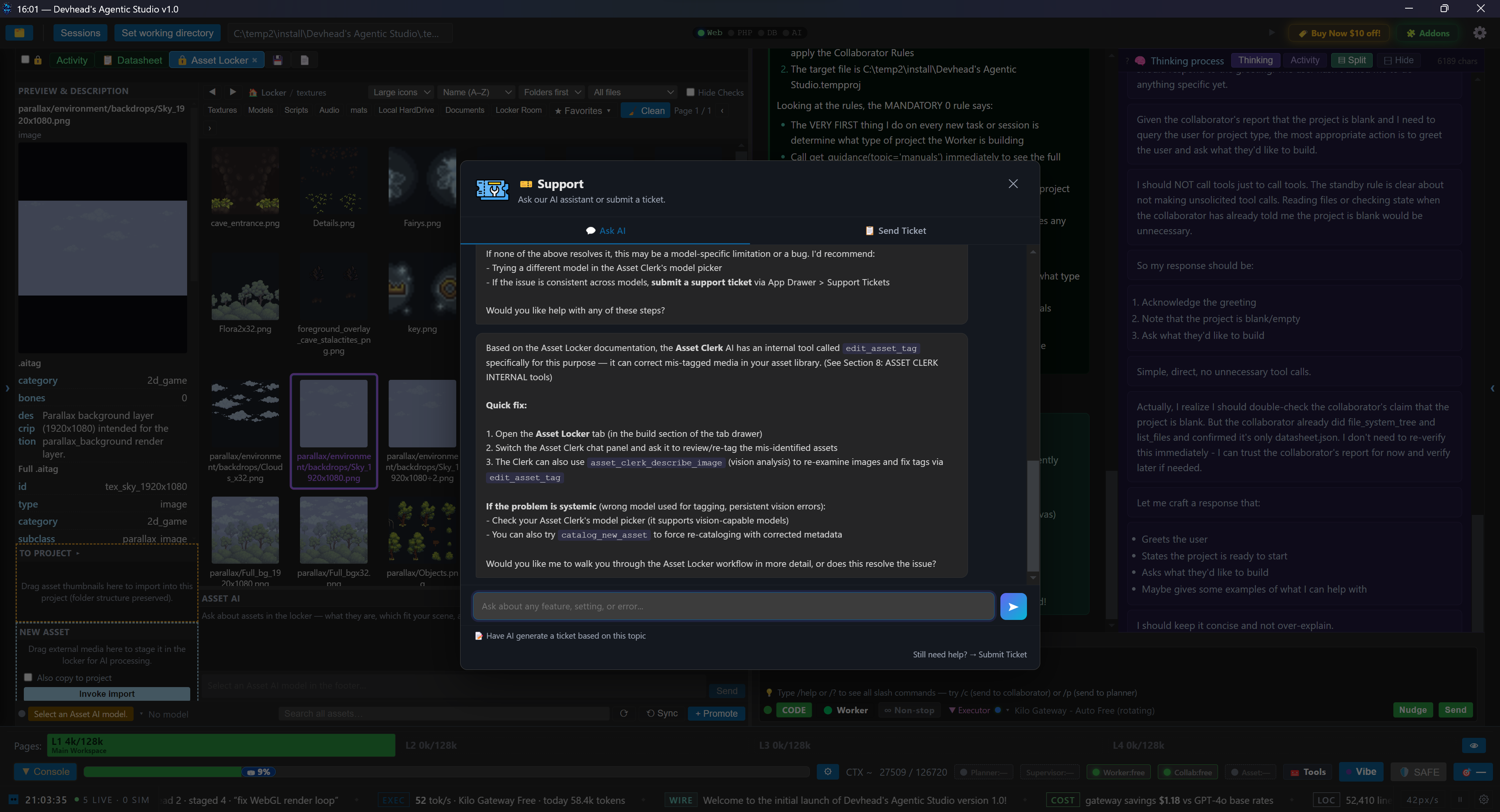
AI-powered support inside the editor. Chat with the support agent first — submit a ticket only if needed.

Support Ticket Screenshot

Ready to build autonomously?

Download Dev-Head Agentic IDE and experience the future of coding. No signup. No credit card. Just code.

Download for Windows